
Skip to the content
SecuriTrack HelpcenterSecuriTrack Helpcenter
  • English
    • Français
    • Español
    • Português
  • English
    • Français
    • Español
    • Português

First steps

  • Your vehicles
  • Your drivers
  • Assignment of vehicles
  • Vehicle groups
  • Groups of drivers
  • Management of access rights
  • User management
  • Vehicle display

Geolocation

  • Home page
  • Driver charter
  • The routes
  • Monitoring areas
  • Trailers and dumpsters
  • History of events
  • Fuel level
  • Address book
  • Immobilizing a vehicle
  • Blocking the taximeter
  • Share location

Fleet Management

  • Dashboard
  • Vehicle file
  • Driver record
  • Statistics
  • TCO
  • History
  • Follow-up invoices
  • Follow-up costs
  • Follow-up contracts
  • Follow-up incidents
  • Follow-up of interventions
  • Follow-up of maintenance
  • Follow-up of damages
  • Follow-up of fines
  • Follow-up of vehicle defects
  • Suppliers
  • Definition of costs
  • Definition of VAT
  • Definition of products
  • Definition of the types of maintenance
  • Cards and badges management
  • Fuel station management
  • Allocation centers
  • Vehicle equipment
  • Equipment allocation
  • Driver’s license presentation
  • Multi-fleet manager

Fuel Monitoring

  • Consumption monitoring
  • Heavy trucks

Eco-driving

  • Setting
  • Data analysis
  • Challenges

Temperature Monitoring

  • Temperature management

Fuel level

Table of Contents
  • View a vehicle's fuel and AdBlue levels (for iCAN box only)

View a vehicle’s fuel and AdBlue levels (for iCAN box only)

This option requires the prior installation of an iCAN box or Fuel Control sensors for heavy duty tanksThe iCAN box retrieves information from the dashboard

1. Click on the icon of the vehicle concerned.
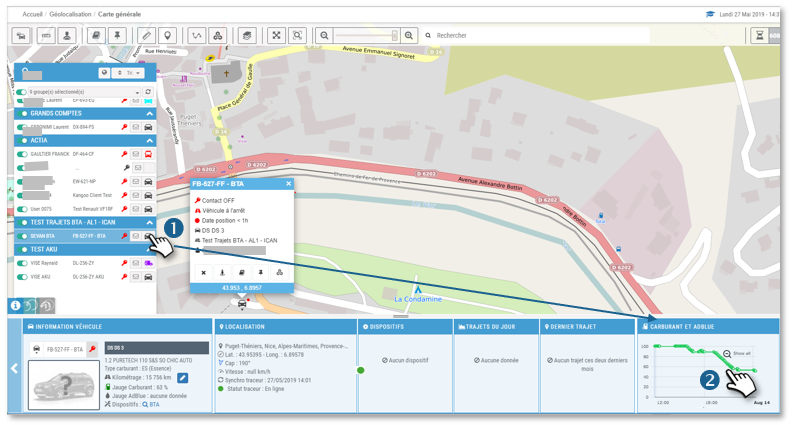
2. In the FUEL AND ADBlUE widget, you see the latest fuel and AdBlue level readings.

3. Click on a probe to display the latest trips with fuel (green) and AdBlue (blue) level curves.
Hover your cursor over a point on the curve to see the level detail and location on the trip.
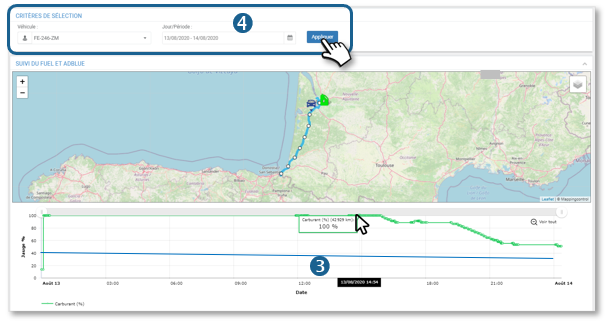
4. You can select another period or vehicle and display the result.

Cet article vous a-t-il été utile ?
Updated on 14 March 2022
History of eventsAddress book
Table of Contents
  • View a vehicle's fuel and AdBlue levels (for iCAN box only)

© 2026 SecuriTrack Helpcenter

Powered by WordPress

To the top ↑ Up ↑