Skip to the content
SecuriTrack HelpcenterSecuriTrack Helpcenter
  • English
    • Français
    • Español
    • Português
  • English
    • Français
    • Español
    • Português

First steps

  • Your vehicles
  • Your drivers
  • Assignment of vehicles
  • Vehicle groups
  • Groups of drivers
  • Management of access rights
  • User management
  • Vehicle display

Geolocation

  • Home page
  • Driver charter
  • The routes
  • Monitoring areas
  • Trailers and dumpsters
  • History of events
  • Fuel level
  • Address book
  • Immobilizing a vehicle
  • Blocking the taximeter
  • Share location

Fleet Management

  • Dashboard
  • Vehicle file
  • Driver record
  • Statistics
  • TCO
  • History
  • Follow-up invoices
  • Follow-up costs
  • Follow-up contracts
  • Follow-up incidents
  • Follow-up of interventions
  • Follow-up of maintenance
  • Follow-up of damages
  • Follow-up of fines
  • Follow-up of vehicle defects
  • Suppliers
  • Definition of costs
  • Definition of VAT
  • Definition of products
  • Definition of the types of maintenance
  • Cards and badges management
  • Fuel station management
  • Allocation centers
  • Vehicle equipment
  • Equipment allocation
  • Driver’s license presentation
  • Multi-fleet manager

Fuel Monitoring

  • Consumption monitoring
  • Heavy trucks

Eco-driving

  • Setting
  • Data analysis
  • Challenges

Temperature Monitoring

  • Temperature management

Immobilizing a vehicle

Table of Contents
  • Activate a vehicle's immobilizer (if hardware accessory installed)
    • Release a vehicle (deactivate the immobilizer)
    • Control from the MASTER Coonect 2 mobile application
    • Relay use case:

Activate a vehicle’s immobilizer (if hardware accessory installed)

In order to activate the immobilizer of a vehicle, the vehicle must have been stationary for at least 10 minutes.

Only after this time will the blocking command be taken into account.

1. Click on the icon of the vehicle concerned.
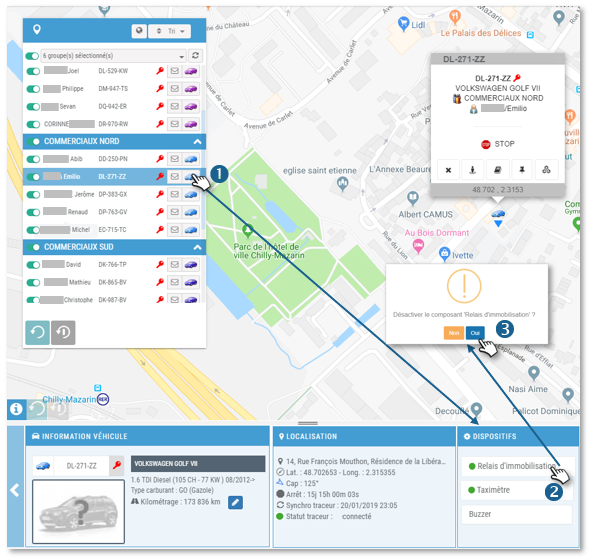
2. In the DEVICES widget, click on “Asset Relay.”

3. Confirm the activation of the immobilizer.

When the technical conditions are met and the immobilizer is activated: the colored dot will turn RED: the vehicle will not be able to start.PRE-REQUISITES BEFORE IMMOBILIZATION :THE VEHICLE MUST BE STOPPED FOR AT LEAST 10 MINUTES AND IN GSM AND GPS COVERAGE AREA.

Release a vehicle (deactivate the immobilizer)

Proceed in the same way: the disc will change from RED to GREEN: the vehicle can be started.

🔴 device disabled: vehicle free

🟢 device activated: vehicle immobilized

Only the Manager and authorized Supervisors can activate the Relay (see SETTINGS > MANAGEMENT OF ACCESS RIGHTS  > ALLOCATION OF RIGHTS)

Control from the MASTER Coonect 2 mobile application
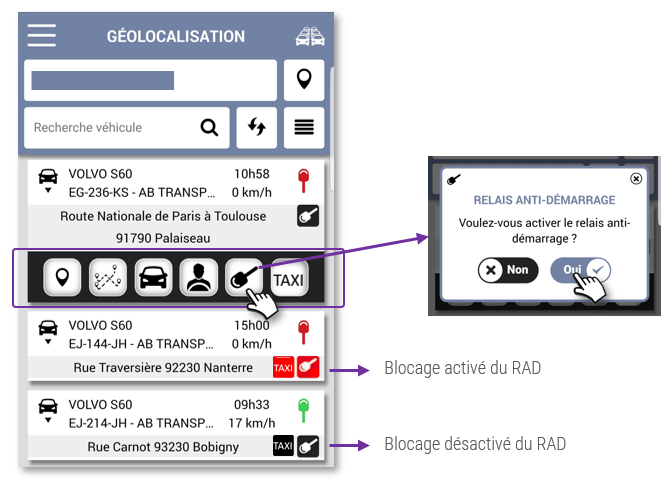
1. GEOLOCATION menu

2. Select the vehicle

3. Click on the icon  and confirm

Relay use case:

I send the blocking command and :

1. The vehicle is moving or stopped, engine running (ignition ON) 👉 the blocking will take place 10 minutes after the next OFF contact. If the vehicle restarts before the 10 minutes, the procedure will be postponed after the next stop, and so on until the vehicle is stopped for more than 10 minutes.

2. The vehicle has been stopped ( ignition OFF) for less than 10 minutes in the GSM and GPS coverage area 👉 the blocking will be effective after 10 minutes of stop.

3. The vehicle has been stopped ( ignition OFF) for 10 minutes in the GSM and GPS coverage area 👉 the blocking is effective immediately (time of sending the SMS).

Cet article vous a-t-il été utile ?
Updated on 13 April 2022
Address bookBlocking the taximeter
Table of Contents
  • Activate a vehicle's immobilizer (if hardware accessory installed)
    • Release a vehicle (deactivate the immobilizer)
    • Control from the MASTER Coonect 2 mobile application
    • Relay use case:

© 2026 SecuriTrack Helpcenter

Powered by WordPress

To the top ↑ Up ↑