
Skip to the content
SecuriTrack HelpcenterSecuriTrack Helpcenter
  • English
    • Français
    • Español
    • Português
  • English
    • Français
    • Español
    • Português

First steps

  • Your vehicles
  • Your drivers
  • Assignment of vehicles
  • Vehicle groups
  • Groups of drivers
  • Management of access rights
  • User management
  • Vehicle display

Geolocation

  • Home page
  • Driver charter
  • The routes
  • Monitoring areas
  • Trailers and dumpsters
  • History of events
  • Fuel level
  • Address book
  • Immobilizing a vehicle
  • Blocking the taximeter
  • Share location

Fleet Management

  • Dashboard
  • Vehicle file
  • Driver record
  • Statistics
  • TCO
  • History
  • Follow-up invoices
  • Follow-up costs
  • Follow-up contracts
  • Follow-up incidents
  • Follow-up of interventions
  • Follow-up of maintenance
  • Follow-up of damages
  • Follow-up of fines
  • Follow-up of vehicle defects
  • Suppliers
  • Definition of costs
  • Definition of VAT
  • Definition of products
  • Definition of the types of maintenance
  • Cards and badges management
  • Fuel station management
  • Allocation centers
  • Vehicle equipment
  • Equipment allocation
  • Driver’s license presentation
  • Multi-fleet manager

Fuel Monitoring

  • Consumption monitoring
  • Heavy trucks

Eco-driving

  • Setting
  • Data analysis
  • Challenges

Temperature Monitoring

  • Temperature management

Definition of costs

Table of Contents
  • Define the wording of costs and their families

Define the wording of costs and their families
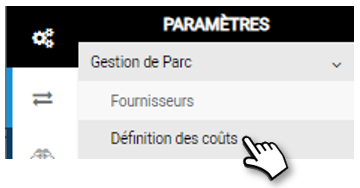
Each cost (label) (e.g.: glass breakage) is linked to a type of cost (e.g.: insurance), which is itself linked to the notion of TCO/Non-TCO:

  • All the labels attached to the TCO (Total Cost of Ownership) will be included in the cost price calculation.
  • Those outside the TCO can be entered in the application, but will not be included in the calculation. These are essentially either exceptional invoiced costs that we do not wish to observe, or elements that we wish to keep track of but which do not represent an expense (e.g. a financial guarantee).

1. Click on NEW to create a new cost or a new type of cost.

2. Enter the name of the cost or cost type.
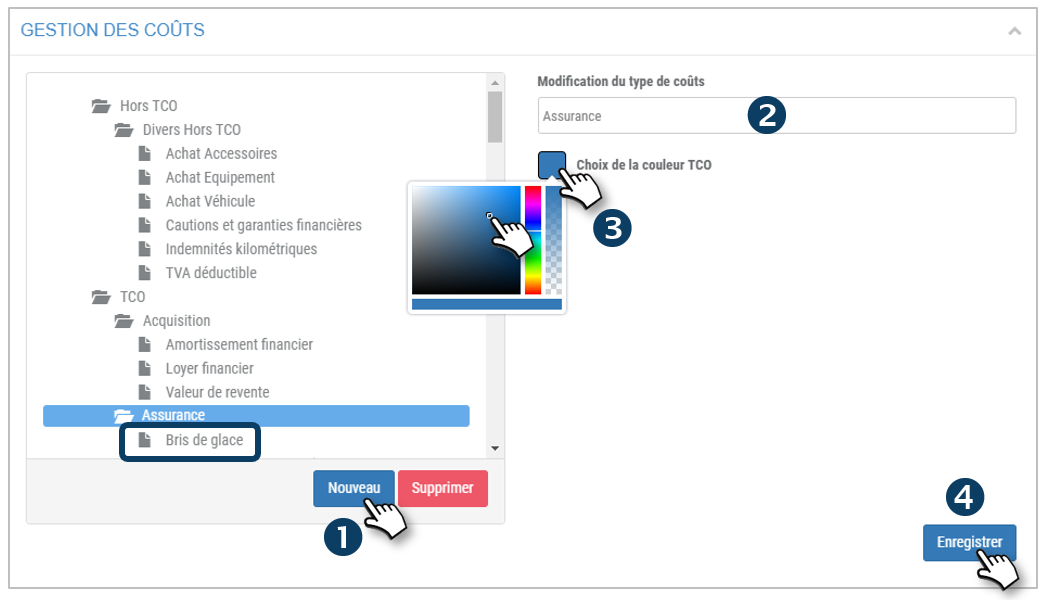
3. For a type of cost, you can choose the color that will represent it on the graphical analyses of the application.

4. Do not forget to SAVE

By clicking on a COST/LABEL (e.g.: Vehicle purchase), enter or select the following information on the right side of the screen:

5. The name of the cost

6. The name and number of the account to which you wish to export the costs to your accounting software.
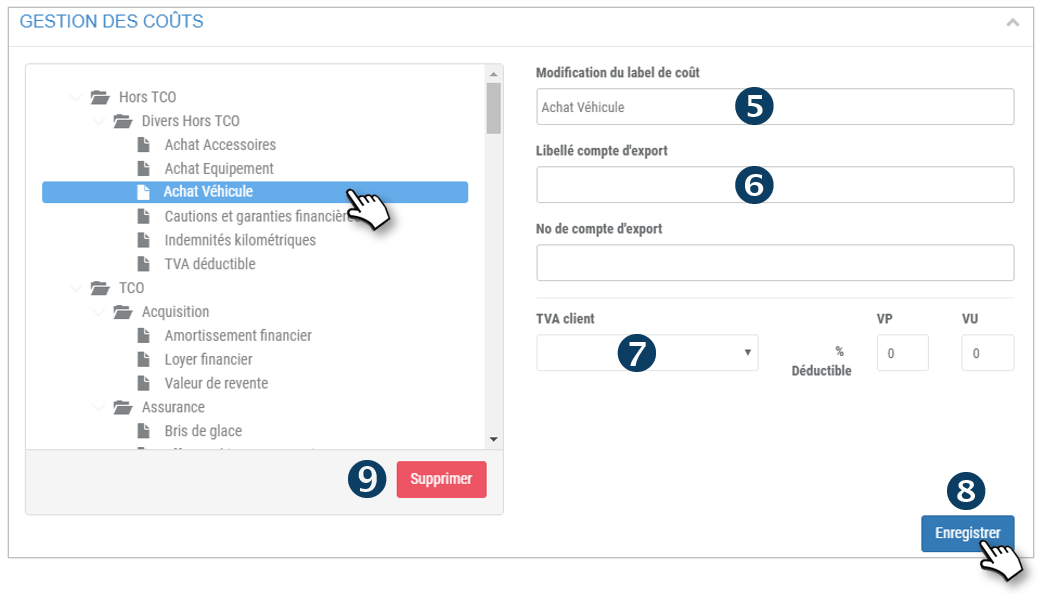
7. The associated VAT to be selected (previously SAVE in: Settings/VAT definition) and its VP/VU deductibility %.

8. Do not forget to SAVE

9. Click to DELETE a type of cost or a cost.

Cet article vous a-t-il été utile ?
Updated on 15 March 2022
SuppliersDefinition of VAT
Table of Contents
  • Define the wording of costs and their families

© 2026 SecuriTrack Helpcenter

Powered by WordPress

To the top ↑ Up ↑