
Skip to the content
SecuriTrack HelpcenterSecuriTrack Helpcenter
  • English
    • Français
    • Español
    • Português
  • English
    • Français
    • Español
    • Português

First steps

  • Your vehicles
  • Your drivers
  • Assignment of vehicles
  • Vehicle groups
  • Groups of drivers
  • Management of access rights
  • User management
  • Vehicle display

Geolocation

  • Home page
  • Driver charter
  • The routes
  • Monitoring areas
  • Trailers and dumpsters
  • History of events
  • Fuel level
  • Address book
  • Immobilizing a vehicle
  • Blocking the taximeter
  • Share location

Fleet Management

  • Dashboard
  • Vehicle file
  • Driver record
  • Statistics
  • TCO
  • History
  • Follow-up invoices
  • Follow-up costs
  • Follow-up contracts
  • Follow-up incidents
  • Follow-up of interventions
  • Follow-up of maintenance
  • Follow-up of damages
  • Follow-up of fines
  • Follow-up of vehicle defects
  • Suppliers
  • Definition of costs
  • Definition of VAT
  • Definition of products
  • Definition of the types of maintenance
  • Cards and badges management
  • Fuel station management
  • Allocation centers
  • Vehicle equipment
  • Equipment allocation
  • Driver’s license presentation
  • Multi-fleet manager

Fuel Monitoring

  • Consumption monitoring
  • Heavy trucks

Eco-driving

  • Setting
  • Data analysis
  • Challenges

Temperature Monitoring

  • Temperature management

History

Table of Contents
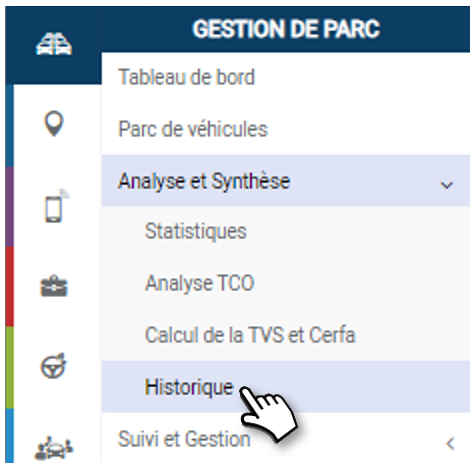
  • Consult the history of a vehicle and/or a driver
    • Selection criteria
    • History

Consult the history of a vehicle and/or a driver

In the same way as on the “History” tab of a vehicle or Driver record, you can find all the time-stamped events in the life of a vehicle and a driver: order, reception, allocation, assignments, carsharing reservations, incidents, accidents, repairs, maintenance, contract amendments, return…..
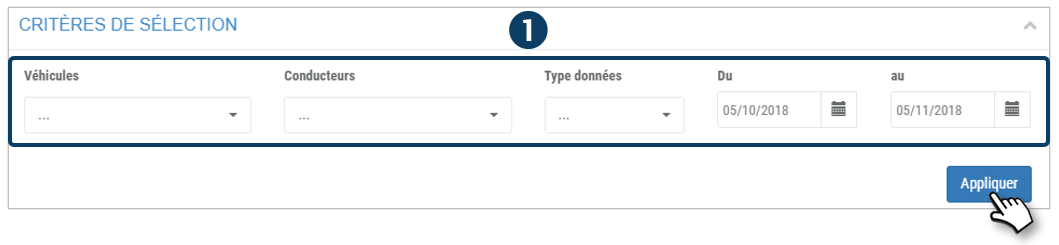
Selection criteria

1. Select the vehicle or driver concerned, the data types (“all” by default) and the analysis period, then click on APPLY.
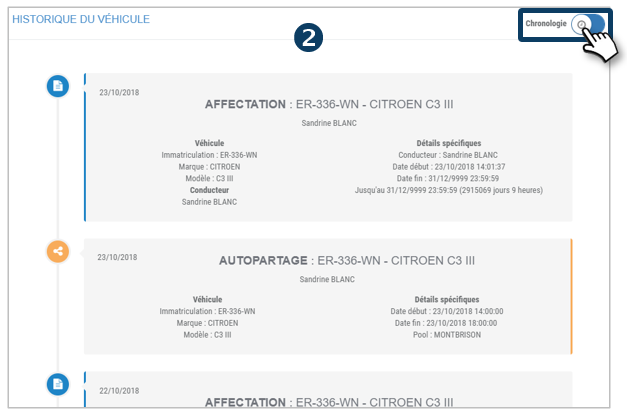
History

The results are displayed here.

2. By default, this history is presented as a timeline, with the most recent event at the top
3. You can also display it in a list in table form by dragging the slider.
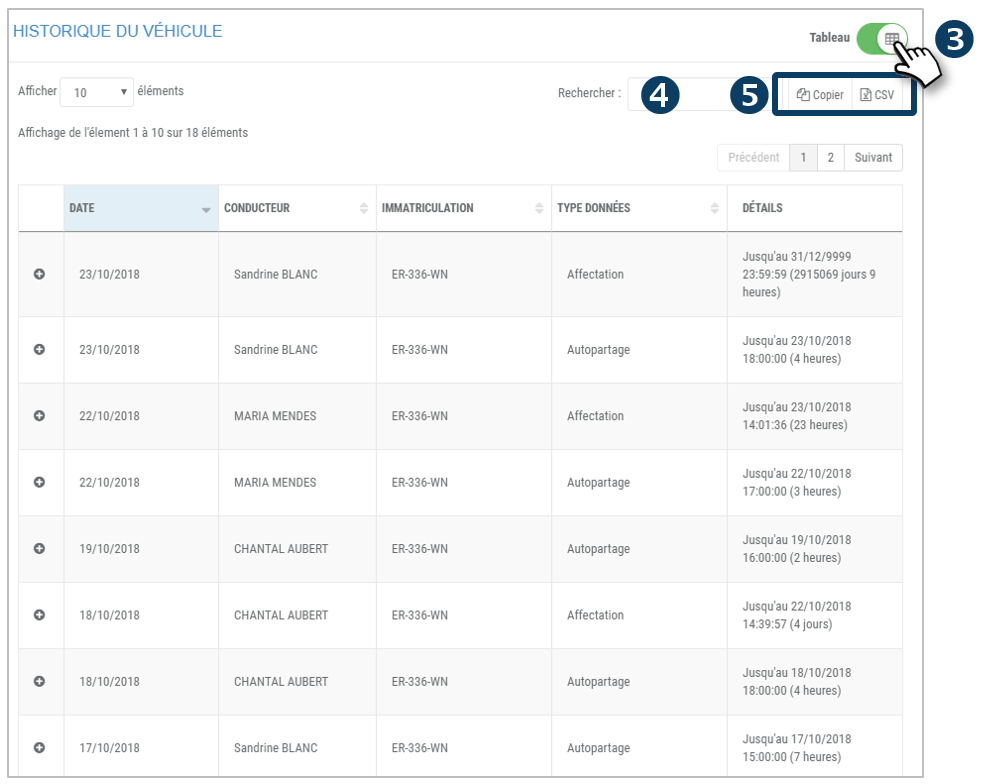
4. Search on a keyword in the list.

5. You can copy and export this table in a .csv format.

Cet article vous a-t-il été utile ?
Updated on 15 March 2022
TCOFollow-up invoices
Table of Contents
  • Consult the history of a vehicle and/or a driver
    • Selection criteria
    • History

© 2026 SecuriTrack Helpcenter

Powered by WordPress

To the top ↑ Up ↑